At least $35,000 lost in April by people who clicked on fake ads offering cheap fare cards that allow unlimited travel


The police received at least 36 reports of phishing scams involving fake advertisements with losses amounting to at least $35,000 since April 1.
Victims encountered advertisements or posts on social media offering promotions on EZ-Link and NETS FlashPay cards that allowed unlimited travel for a low fare from scammers impersonating EZ-Link, SimplyGo or the Land Transport Authority.
To gain access to these offers, victims would click on links in the advertisements or posts and be redirected to a phishing website.
They would then be prompted to key in their credit or debit card details, banking credentials and one-time passwords (OTPs) for the purchase of transportation cards.
In some cases, to make the ruse more believable, victims would first be asked to participate in online games or questionnaires to qualify them for the “promotion”.
After successfully winning a “gift box” with a “free EZ-link" card, the website would prompt them to key in their card details to pay for the unlimited travel EZ-Link or NETS FlashPay cards.
However, there were no such unlimited travel promotions and the criminals were merely phishing for credit/debit card details.
Eventually, the victims realised that they had been scammed when they discovered unauthorised transactions in their bank accounts or credit cards, and in some cases, transactions were made to Grab or GrabPay Wallets.
Some transactions were also made in foreign currencies.
All promotions for EZ-Link and NETS FlashPay cards are conducted only on SimplyGo, NETS websites and the social media pages of SimplyGo, EZ-Link and NETS respectively.
SimplyGo does not offer “$1.99 for unlimited travel” deals, and NETS does not offer “$6 for unlimited travel” deals.
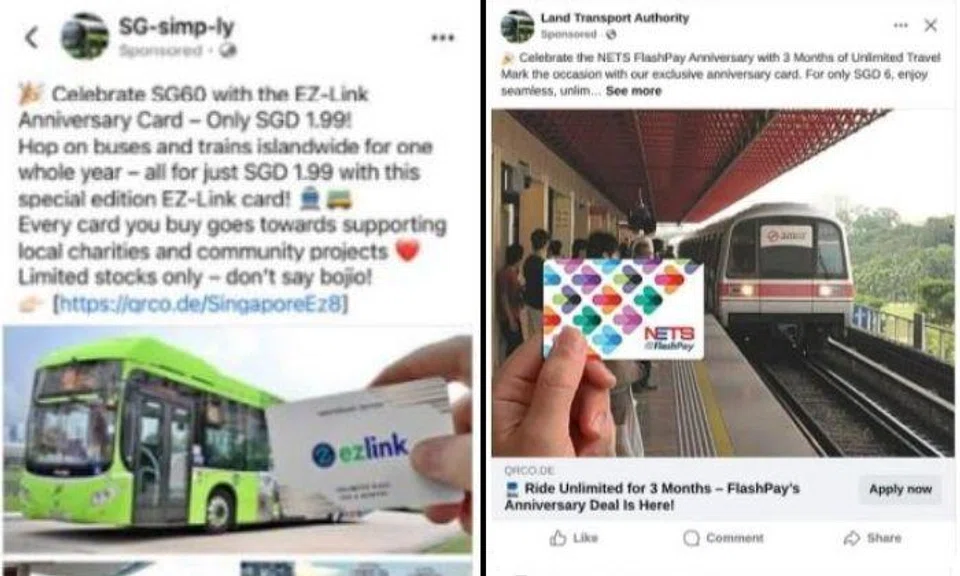
Official information on the purchase of EZ-Link or NETS FlashPay cards can be found on their websites.
Members of the public are encouraged to adopt the following precautionary measures to avoid falling for scams:
- ADD - Add the ScamShield app and set security features (e.g. set up transaction limits for internet banking transactions, enable two-factor authentication (2FA), multifactor authentication for banks and e-wallets, use the money lock feature of your bank to "lock up" a portion of your money so that it cannot be transferred out digitally by anyone, further protecting your savings from scams). Do not disclose your personal information, bank/card details and OTPs to anyone.
- CHECK - Check for scam signs with official sources such as the ScamShield App. Call and check with the 24/7 ScamShield Helpline at 1799.
- TELL - Tell the authorities, family, and friends about scams. Report any fraudulent transactions to your bank immediately and report any suspicious advertisements to the company or platform.
For more information on scams, visit www.scamshield.gov.sg.

Explore more on these topics
See something interesting? Contribute your story to us.
